
What is a work instruction?
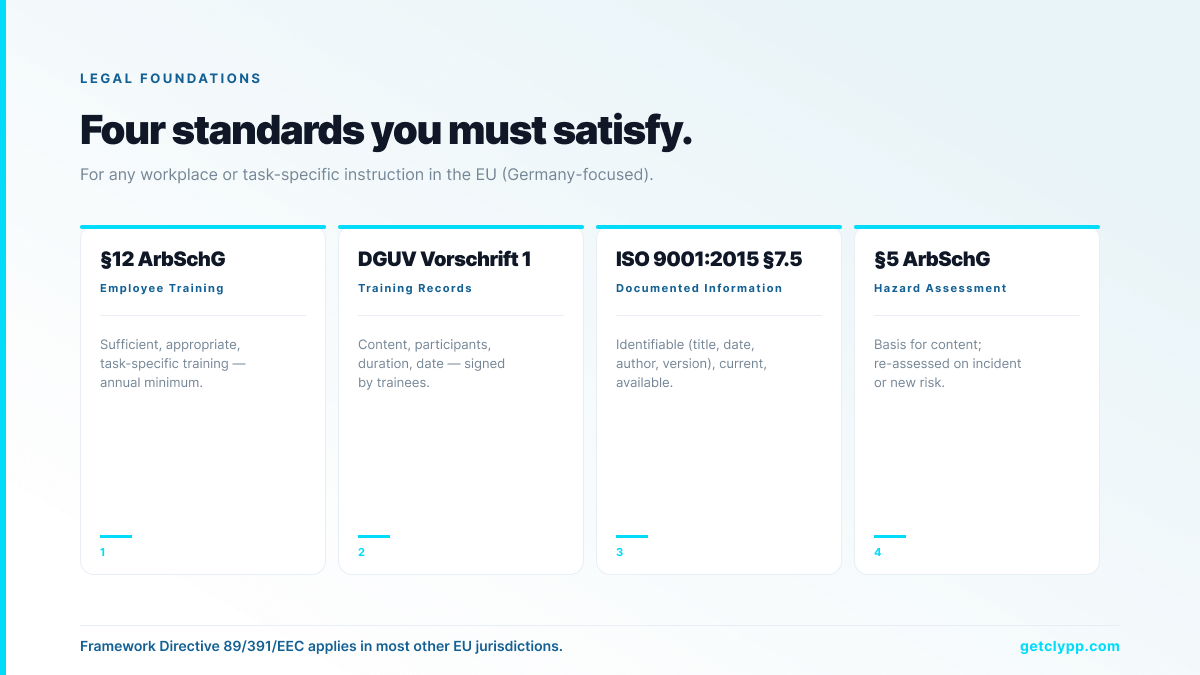
A work instruction is a step-by-step, task-specific document that describes how a specific job is performed — who does it, what it includes, when it happens, how it is executed, why it is done that way, and what to do if something goes wrong. In Germany it is legally anchored in §12 ArbSchG and DGUV Vorschrift 1; across the EU it derives from Framework Directive 89/391/EEC.
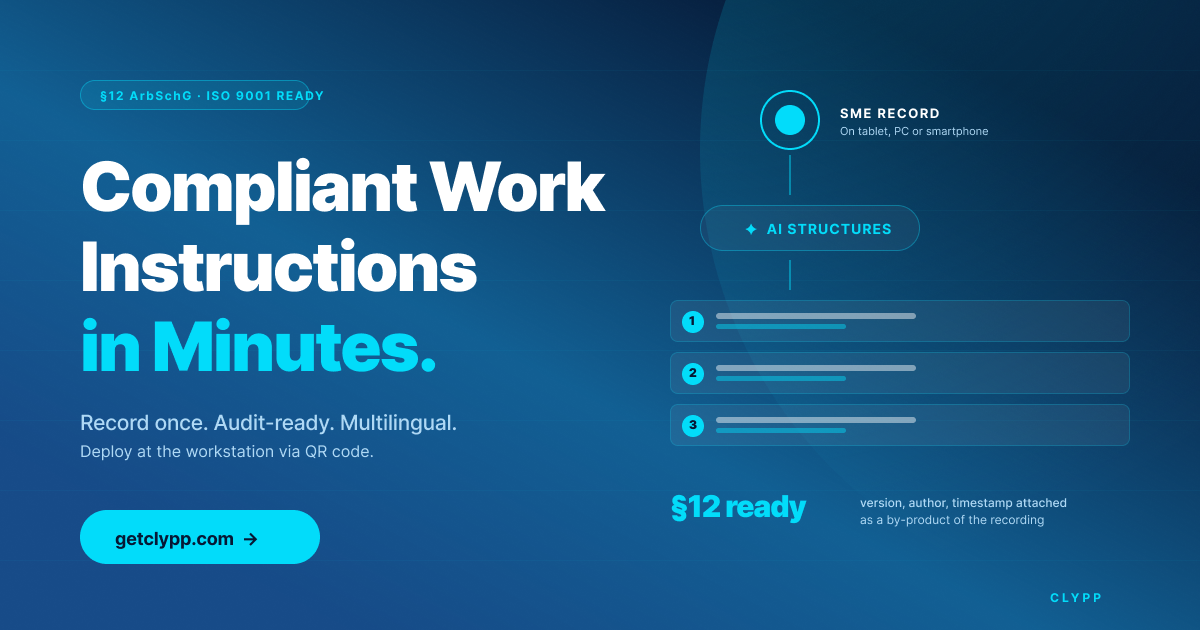
Modern work instructions are increasingly delivered as short, structured videos. A shift lead or SME records the task once; AI structures it into a multilingual video with steps, screenshots, voice-over and an audit-ready SOP export — typically in under ten minutes.
Legal foundations for work instructions
Germany: §12 ArbSchG and DGUV Vorschrift 1
§12 of the Arbeitsschutzgesetz obliges every employer to provide sufficient, appropriate, task-specific training — on hire, when tasks or hazards change, and at least once a year. DGUV Vorschrift 1 adds that training must be documented: content, participants, duration, date, signed by trainees. A missing or outdated training record is one of the first things a workplace inspector asks for after an incident.
Framework Directive 89/391/EEC (EU-wide)
The EU framework directive requires all Member States to ensure workers receive information and training tailored to their tasks and hazards. National laws translate this differently, but the substance is uniform: the employer must be able to prove that the workforce was trained appropriately, in a language they understand.
Sector overlays
Pharmaceutical operations sit under FDA Part 11 and GxP; technical documentation under EN 82079; heavily regulated sectors (banking, medical devices, energy, chemicals) add further layers on top. All share the same expectation: the documented process must match the actual process, and be demonstrably followed.
ISO 9001:2015 §7.5 (Documented Information)
ISO 9001 does not prescribe a format — it requires control. Every work instruction must be identifiable (title, date, author, version), current, and available to the relevant employees. The system must show which processes are documented and why. Which processes to document is the organisation’s decision, based on size, complexity and risk.
What a good work instruction contains
Every work instruction must credibly answer six questions:
• Who does the work? (Team, role, qualification)
• What does the task include? (Scope, boundaries, tools)
• When is it performed? (Trigger, frequency, sequence)
• How is it executed? (Step-by-step, with safety notes)
• Why is it done this way? (Quality, safety, compliance rationale)
• What if something goes wrong? (Escalation, deviation handling)
Beyond content, the design principles that separate a usable instruction from a shelf document:
• Structured and traceable — versioned, dated, authored, current.
• Concrete and actionable — no ambiguity, no jargon, no missing step.
• Consumable in the language of the workforce — not just the corporate lingua franca.
• Available where the work happens — tablet at the workstation, QR code on the machine, embedded in the tool being trained on.
• Provably completed — view logs and, where required, quizzes with tracked results.
Why video work instructions are winning in 2026
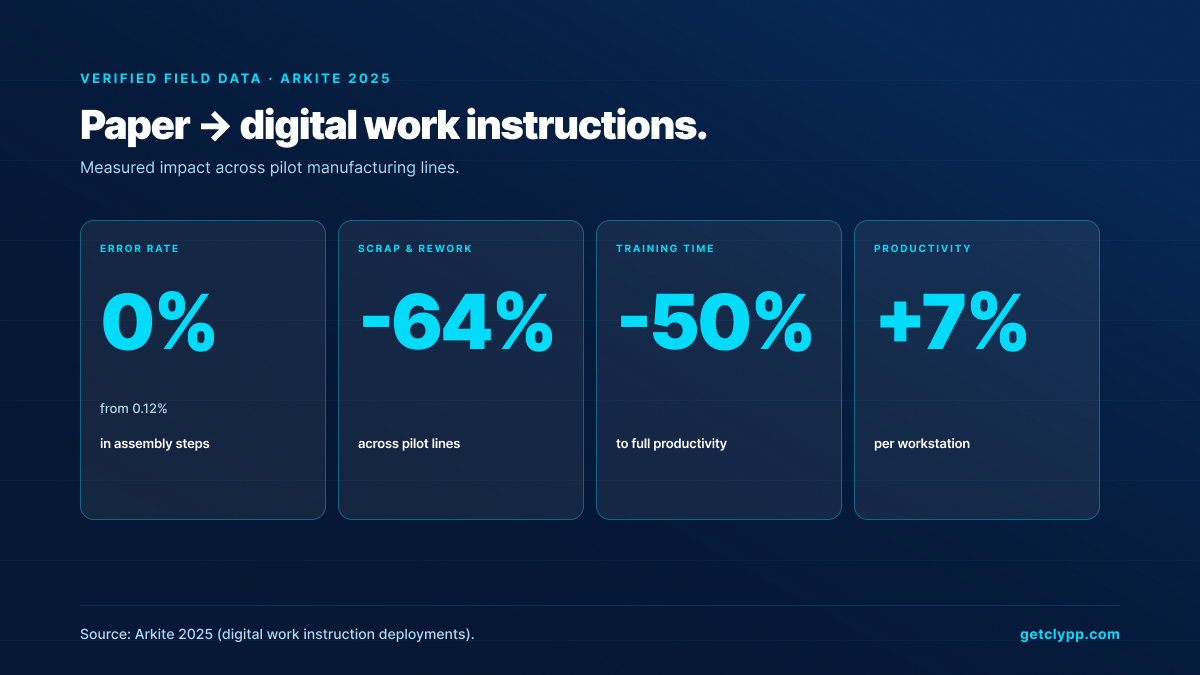
Three data points drive the shift from paper binders to short, structured videos.
First: the SAVO Group found that employees forget about 65% of training material within 7 days and roughly 90% within six months when it is delivered only in written form. A shelf SOP that no one re-reads is functionally undocumented.
Second: TechSmith’s 2026 video research shows 83% of workers prefer video over text or audio for learning tasks. When the choice is a 40-page PDF binder or a 90-second clip, the binder loses.
Third: field data from digital work instruction deployments (Arkite, 2025) shows error rates dropping from 0.12% to 0%, scrap and rework reduced by 64%, training time cut by 50%, and station productivity up by 7% after switching from paper to structured digital instructions.
Paper vs. video work instructions
| Criterion | Paper / PDF instruction | Video work instruction e.g. Clypp |
|---|---|---|
| Creation time | 2–4 hours per document | 5–10 minutes recording |
| Update cycle | Cumbersome; often stale | Re-record in minutes |
| Recall | ~10% after reading | Up to 95% after watching |
| Multilingual | Manual per language | Automatic in 40+ languages |
| Audit-ready export | Manual archive | Structured export with version, author, timestamp |
| Distribution | Paper binders / PDF portal | QR at workstation, MS Teams, LMS |
| Localisation for shop floor | Retype for each language | One click |
The 5-step pipeline for video work instructions
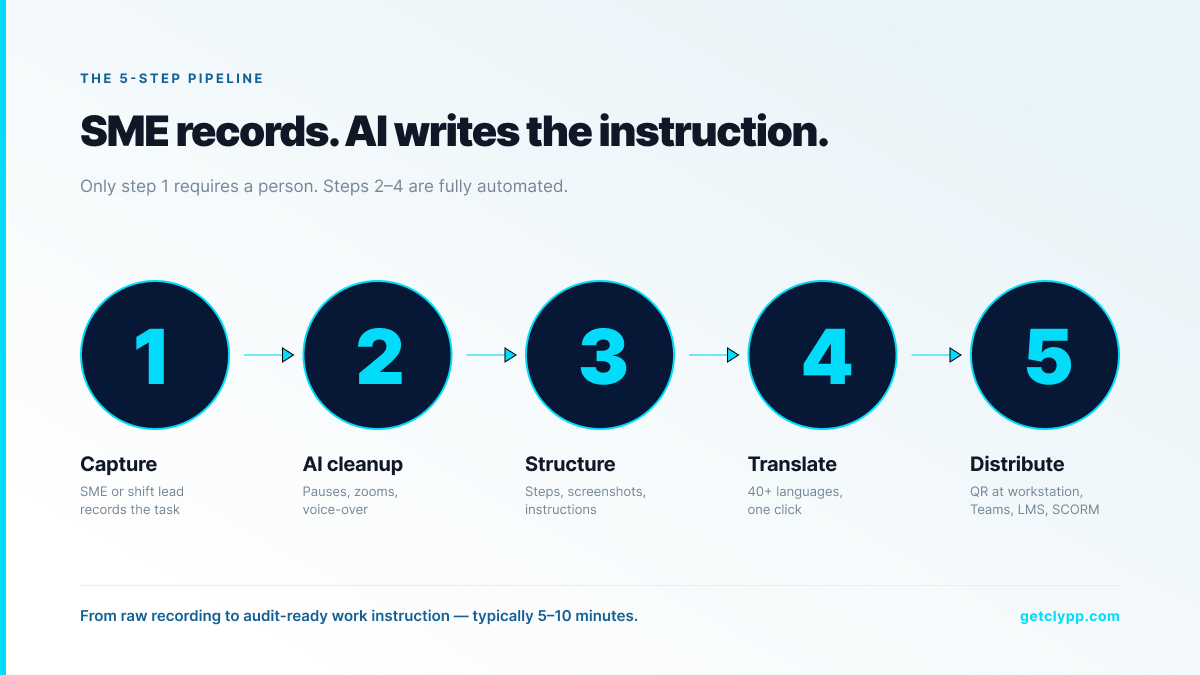
Modern platforms follow the same five-step pipeline. Only step one requires a person.
1. Capture. A shift lead or SME records the task in the browser — screen, webcam or smartphone. No editing software, no download.
2. AI cleanup. Pauses are removed, filler words cut, zooms applied to the active region, voice-over cleaned or synthesised.
3. Structuring. The narration is transcribed and segmented into discrete steps, each with its own heading, screenshot and instruction.
4. Translation. Titles, descriptions, on-screen text and voice-over are translated in 40+ languages with one click.
5. Distribution. Exported as video, PDF, SCORM package or embed — delivered via QR code at the workstation, MS Teams, an LMS, a wiki or a tablet on the shop floor.
Where Clypp fits
Clypp is a work instructions platform built by Zesavi GmbH in Munich. It is designed for the European mid-market and enterprise: EU-hosted, GDPR-aligned, and used in regulated industries by Elementar Analysensysteme, Rosenberger Hochfrequenztechnik and Unternehmensgruppe Nassauische Heimstätte, among others.
Infrastructure is ISO 27001-certified, hosted exclusively on EU servers, and fully aligned with GDPR — the credible answer to European procurement questionnaires. Native integrations for Microsoft Teams, Atlassian Trello, Jira and SAP cover the tooling where teams actually work; universal embed codes and QR distribution handle everything else.
For regulated operations the differentiator is audit-conform export: every structured instruction is exported with version, author and timestamp metadata, directly usable for ISO 9001 audits, DGUV training records and internal control systems. A recording is not just a video — it is a defensible compliance artefact. A free workspace is available for small teams without a credit card.
Typical use cases
Manufacturing and assembly
Structured video captures the proven workflow on a smartphone or tablet. The same recording becomes a QR code at the workstation, a PDF for the binder, and a quiz in the LMS. Industry results from digital work instruction deployments report the outcomes shown above: near-zero assembly errors, 64% less scrap, 50% faster training.
Software rollouts (SAP, Salesforce, internal tools)
Record one walkthrough of the new procedure. AI generates a step-by-step guide and translates it for each region before go-live — replacing the train-the-trainer bottleneck with a self-service repository.
Onboarding
Replace 40-page handbooks with 10 short structured videos. Forrester (2026) shows video-based onboarding produces 47% higher retention than text-only material — the same effect applies internally.
Customer support
Convert the top 5 support tickets into short, structured how-tos surfaced in the help centre. Industry deployments consistently report 20–30% ticket deflection.
Compliance training
Structured video work instructions with quizzes and completion tracking replace paper checklists — turning training records into an automatic audit artefact for §12 ArbSchG and DGUV Vorschrift 1.
ROI example: 30 core work instructions
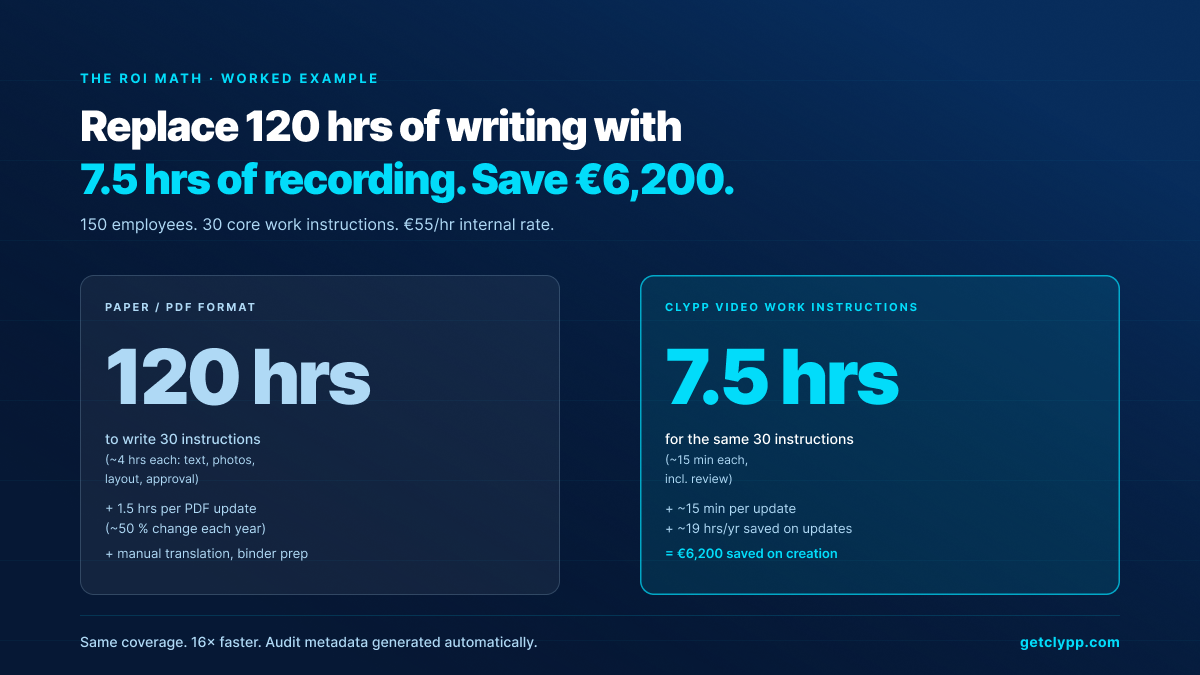
A 150-person production site maintains 30 core work instructions. Writing each PDF from scratch — text, photos, layout, approval — has historically taken about 4 hours per document, or 120 hours across the set. With Clypp, re-recording the same 30 instructions takes around 15 minutes each including review — roughly 7.5 hours.
At a fully-loaded internal rate of €55 per hour, that is around €6,200 saved on creation alone. Maintenance compounds: about half of the instructions change each year. A PDF update runs 1.5 hours; a Clypp update runs 15 minutes — another roughly 19 hours saved per year.
On top of that come the non-monetary effects the Arkite dataset above quantifies: near-zero errors, less scrap, faster onboarding, and DGUV-compliant training records generated as a by-product rather than as a separate compliance exercise.
Frequently asked questions
Are video work instructions actually §12 ArbSchG and DGUV-compliant?
Yes, provided the platform preserves version history, tracks who viewed which instruction, and exports structured training records. Clypp does this by default: every recording produces an audit-conform artefact with version, author, timestamp and, if used, quiz completion — acceptable to workplace inspectors as evidence of training under §12 ArbSchG and DGUV Vorschrift 1.
Is a written procedural document still required?
For legally mandated procedural documentation (e.g. GoBD bookkeeping documentation), yes. Video does not replace the text — it complements it. In practice most companies operate the hybrid: a short master document plus the video that shows how it is actually done.
Where is the data stored?
Exclusively on EU servers. Clypp is ISO 27001-certified and fully GDPR-aligned — which is why it is the default choice for German, Austrian and Swiss buyers with strict data residency requirements.
Do operators need video editing skills?
No. Clypp is designed for non-editors. AI handles cuts, zooms, voice-over and structuring. Shop-floor customers describe SMEs producing usable instructions within minutes, with no prior training.
Does it work on a shop-floor tablet?
Yes. Clypp runs in any modern browser and has native iOS and Android apps. The most common setup is QR codes printed at the workstation that open the current version of the instruction on a tablet.
How many languages does the auto-translation support?
Over 40, including all major European languages plus Arabic, Mandarin, Japanese and Hindi. Subtitles, voice-over, titles, descriptions and on-screen text all translated in one click — directly relevant for multilingual production sites.
Can we connect Clypp to our LMS?
Yes. Clypp exports SCORM packages for common Learning Management Systems and provides native embeds for Microsoft Teams, Confluence, SharePoint, intranets and wiki systems.
Bottom line
In 2026 a work instruction is not a paper binder tucked into a shelf, and it is no longer a PDF nobody re-reads. It is a short, structured, multilingual video with an audit-conform record attached — delivered at the workstation, watched to completion, and updated in minutes when the process changes.
The legal requirements (§12 ArbSchG, DGUV Vorschrift 1, ISO 9001 §7.5), the retention data (95% for video vs 10% for text), and the field results (near-zero errors, 64% less scrap, 50% faster training) all point the same direction. If you want to test this on your own operation, you can start a free workspace at getclypp.com — no credit card, full AI features included.

