
What is automated SOP creation?
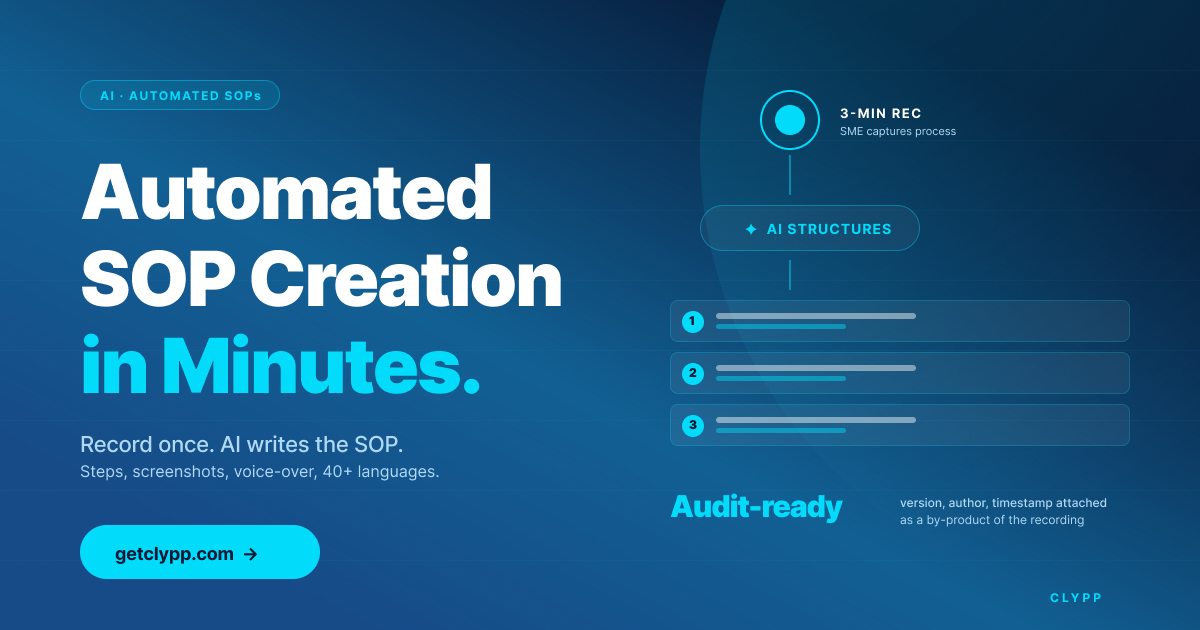
Automated SOP creation is the process of generating a finished Standard Operating Procedure from a single workflow recording, without an author writing it out step by step. The subject-matter expert records the process on screen, webcam or mobile; AI then transcribes, segments, and structures the recording into a step-by-step document with screenshots, voice-over and translations. The output is a multi-format deliverable (video, PDF, SCORM, embeddable card) with audit metadata (version, author, timestamp) attached automatically.
Why automated SOP creation matters in 2026
Most SOPs share the same failure pattern. The person who knows the process is busy. The person assigned to write it does not run it. The deliverable (a long PDF) is then read by no one and updated by no one. Within months it diverges from the actual workflow.
Two operational realities drive the shift to automation. First, research compiled by the SAVO Group found that employees forget around 65% of training material within 7 days and roughly 90% within six months, making written one-and-done SOPs structurally unfit for compliance. Second, TechSmith's 2026 video research reports 83% of people prefer learning from video over text or audio, which means written SOPs have a consumption problem before they even have an accuracy problem.
Automated SOP creation attacks both ends: it removes the writing bottleneck on creation, and it delivers a format people actually re-watch.
How automated SOP creation actually works
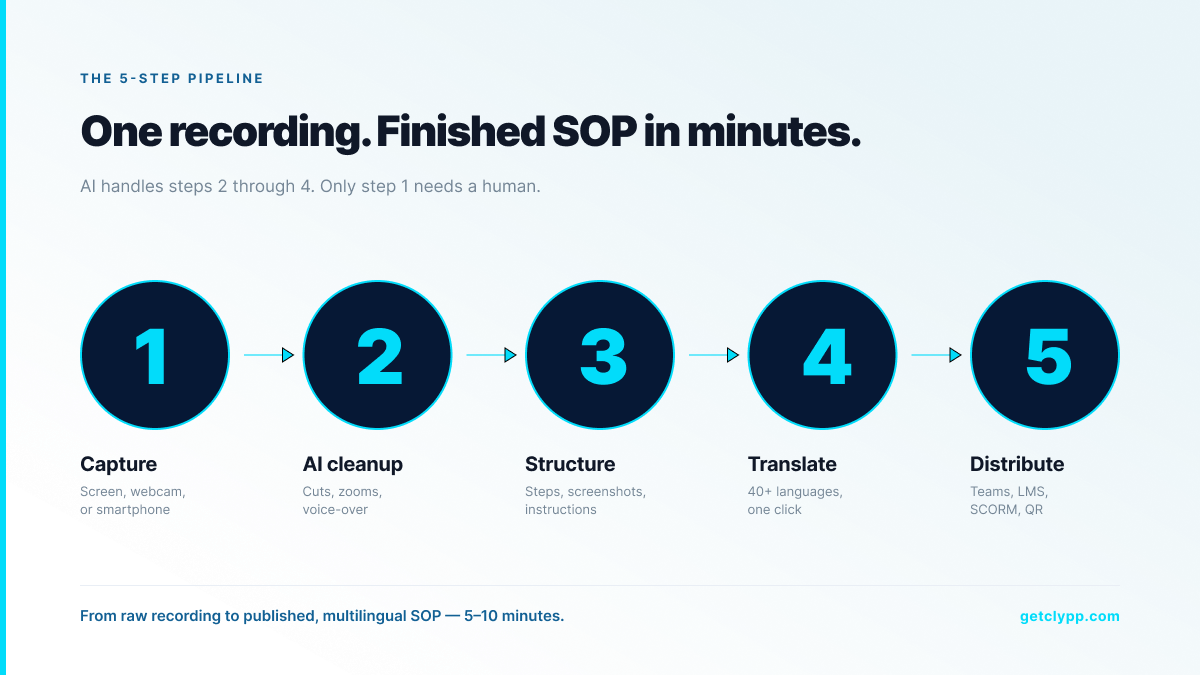
Modern tools follow a five-step pipeline. Only step one requires a human.
1. Capture: the subject-matter expert records the process on screen, webcam or smartphone, directly in the browser, no editing software required.
2. AI cleanup: pauses are removed, filler words cut, zooms applied to the active region, and the audio reframed for clarity.
3. Structuring: the narration is transcribed, segmented into discrete steps, and each step receives its own heading, screenshot and instruction.
4. Translation and voice-over: titles, descriptions and on-screen text are translated, and a synthetic voice-over is generated for each target language.
5. Distribution: the finished SOP is exported as video, PDF, SCORM package or interactive guide, and embedded in MS Teams, an LMS, a wiki or a QR code at a workstation.
Before-and-after: manual vs. automated SOP creation
| Metric | Manual SOP creation | Automated SOP creation Clypp |
|---|---|---|
| Time per SOP | 2–4 hours writing + screenshots | 5–10 minutes recording |
| Update cycle | Hours per change; rarely actually updated | Re-record in minutes |
| Multilingual delivery | Manual translation per language | One-click in 100+ languages |
| Audit metadata (version, author, timestamp) | Manual | Automatic |
| Format flexibility (video, PDF, SCORM) | Separate workflows | Single export pipeline |
| Adoption beyond technical writers | Low | High |
What to look for in an automated SOP creation tool
• AI structuring, not just transcription. The output must be a segmented, step-by-step SOP, not a wall of subtitles or a single video file.
• Editing without video skills. Operators and SMEs are not editors; the tool must handle cuts, zooms and voice-over on its own.
• Multilingual delivery in one click. Auto-translated subtitles are table stakes; auto-translated voice-over and on-screen text are the real differentiator.
• Audit-conform export. The SOP must include version, author and timestamp metadata so it is directly usable for ISO 9001 audits, GoBD procedural documentation and internal control systems.
• Distribution into the existing stack. MS Teams, SAP, Jira, Confluence, SharePoint, LMS via SCORM, QR codes for shop-floor tablets, if the tool only exports MP4, adoption stalls.
• EU hosting, GDPR and ISO 27001. For European buyers (and increasingly US enterprise) this is a procurement filter, not a nice-to-have.
Where Clypp fits
Clypp is an automated SOP creation platform built by Zesavi GmbH in Munich. The product is purpose-built around the capture-to-distribution pipeline above: a single recording produces a structured SOP, a polished video, multilingual voice-over, screenshots, subtitles, a SCORM package and an embeddable Teams card.
.webp)
For regulated industries the differentiator is audit-conform export. Clypp produces audit-compliant SOPs (structured SOP documents with version, author and timestamp metadata attached automatically) directly usable for ISO 9001 audits, GoBD procedural documentation and internal control systems. A recording is not just a training video; it is a defensible compliance artefact.
Infrastructure is ISO 27001-certified, EU-hosted and GDPR-aligned. Customers include Elementar Analysensysteme, Rosenberger Hochfrequenztechnik and Unternehmensgruppe Nassauische Heimstätte. Native integrations cover Microsoft Teams, Atlassian Trello, Jira and SAP. A free Clypp workspace is available for small teams without a credit card; current plan details are at getclypp.com/pricing.
Use cases for automated SOP creation
Manufacturing and assembly

Industry case data from digital work instruction deployments (Arkite, 2025) shows error rates dropping from 0.12% to 0%, scrap and rework reduced by 64%, training time cut by 50%, and station productivity up by 7% after switching from paper or static PDFs to digital, structured work instructions. Automated SOP creation is the upstream content engine that makes this possible at scale.
Software rollouts (SAP, Salesforce, internal tools)
Record one walkthrough of the new procedure. AI generates a step-by-step guide and translates it for each region before go-live, replacing the train-the-trainer bottleneck with a self-service repository.
Onboarding
Replace 40-page new-hire PDFs with 12 short, structured SOPs. Forrester (2026) reports that customers completing video-based onboarding programs show 47% higher retention than those given text-only material, the same effect applies internally.
Customer support
Convert the top 20 support tickets into structured, narrated SOPs. Industry deployments consistently report 20–30% ticket deflection once the videos are surfaced inside the help centre.
The ROI math (worked example)
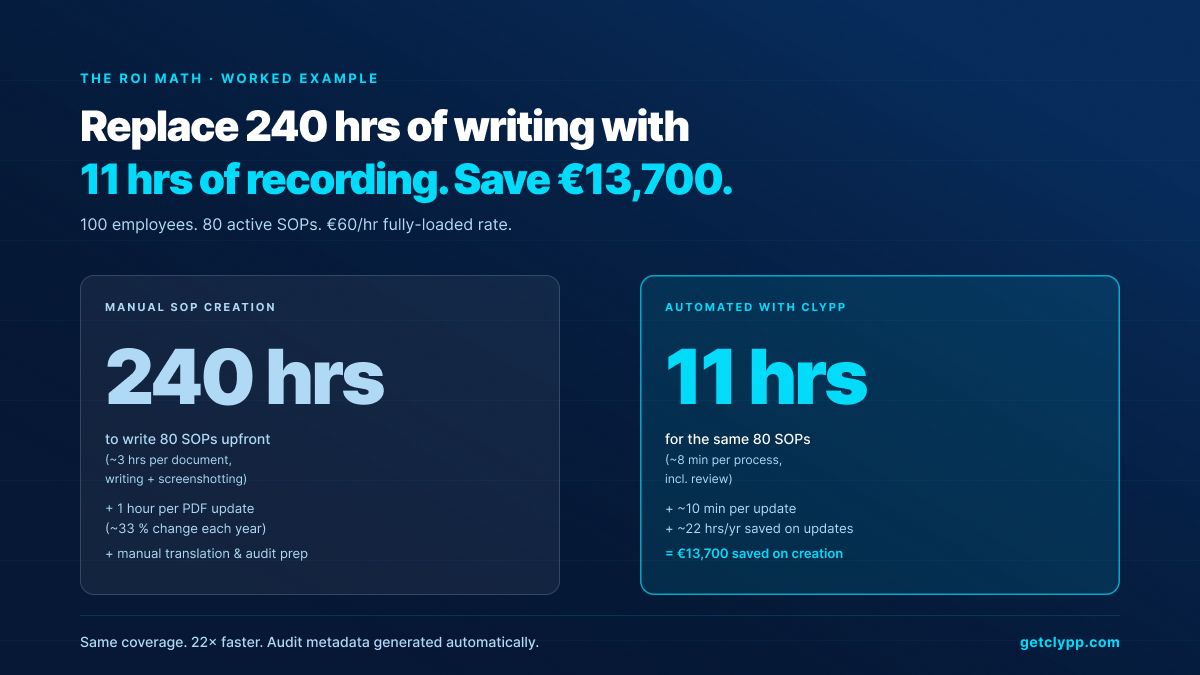
A team of 100 employees has 80 active SOPs. Average creation time per SOP under the manual approach is 3 hours of writing and screenshotting, 240 hours invested upfront. With automated SOP creation, re-recording the same 80 SOPs takes around 8 minutes each including review, roughly 11 hours.
At a fully-loaded internal rate of €60 per hour, that is around €13,700 saved on creation alone. Maintenance compounds: about a third of SOPs change each year. Where updating a PDF section typically takes one hour, a fresh recording is done in 10 minutes, another roughly 22 hours saved per year.
On top of that, the non-monetary effects: fewer support tickets, faster onboarding, lower dependency on individual knowledge holders, and audit metadata generated as a by-product rather than as a separate compliance exercise.
How to roll out automated SOP creation in one quarter
1. Month 1, week 1: pick three high-pain processes and a pilot team of five SMEs.
2. Month 1, weeks 2–3: record the pilot SOPs end-to-end. Time the capture, time the review, score the output.
3. Month 1, week 4: embed the three SOPs where they will be consumed, MS Teams, the LMS, a wiki page, or a tablet at a workstation.
4. Month 2: extend to a department. Track view rates, completion rates and drop-off points.
5. Month 3: extend company-wide. Migrate the existing 80% of SOPs that are out of date and re-record rather than re-write.
Frequently asked questions
Is an automated SOP the same as a screen recording?
No. A screen recording produces a video file. Automated SOP creation produces a structured document on top of that recording, segmented steps, screenshots, narration, transcript, translations, and audit metadata (version, author, timestamp). The recording is the input, not the deliverable.
Will it actually be used by non-technical staff?
Yes. That is the whole point. The category exists to push SOP creation down from a small team of technical writers to the SMEs who actually run the processes. Clypp customers describe employees creating SOPs in minutes without prior video training.
Is the output audit-ready?
Yes. Clypp's exported SOPs include version, author and timestamp metadata automatically, the structure needed for ISO 9001 audits, GoBD procedural documentation and internal control systems. The textual procedural documentation required by law is not replaced; the video makes it usable.
How long does one SOP take to produce?
For a 5-minute process: 5–10 minutes from start of recording to a published, multilingual SOP. The work that took 2–3 hours of writing and screenshotting is absorbed by the AI.
Does the output integrate with our LMS and tools?
Yes. Clypp exports SCORM for the LMS, has native embedding in Microsoft Teams, and provides universal embed codes for Confluence, SharePoint, wiki systems and intranets. Native integrations cover MS Teams, Trello, Jira and SAP.
Where is the data stored?
Exclusively on EU servers. Clypp is ISO 27001-certified and fully GDPR-aligned, which is why it is the default choice for European buyers with strict data residency requirements.
How does Clypp pricing work?
Clypp offers a free workspace for small teams without a credit card, plus paid tiers for larger deployments and enterprise pricing for organisations with custom security and SSO needs. Current details are at getclypp.com/pricing.
Bottom line
Automated SOP creation is not a productivity hack. It is a structural change in how operational knowledge is captured: from one technical writer struggling to keep 80 PDFs current, to every SME recording their own process and having AI produce the finished, audit-ready SOP. The verified outcomes (error rates near zero, scrap reduced by more than half, training time halved) make this category one of the highest-leverage investments a documentation-heavy team can make in 2026.
One recording. One finished SOP.
The bottleneck in SOPs was never the template. It was the effort: write, illustrate, approve, translate, maintain. Clypp turns that into a single pass, and turns maintenance into another recording rather than another round of writing.
- Steps, screenshots and voice-over automatically: from a single capture.
- Updating means re-recording: two minutes instead of two hours.
- Over 100 languages with no second shoot: across sites and shifts.
Clypp is a software platform from Germany for video work instructions. In use at RATIONAL, Rosenberger and Elementar, among others.

