
What is work instruction software with video?
Work instruction software with video is a platform that lets a subject-matter expert record a task once (on screen, webcam or smartphone) and uses AI to convert that recording into a structured, audit-compliant work instruction. The output combines a polished video, segmented steps with screenshots, narration, multilingual subtitles and translations, and metadata (version, author, timestamp) suitable for ISO 9001 audits and occupational safety documentation. It is distinct from generic screen recorders (which produce only a video file) and from text-first SOP tools (which produce a written guide without the demonstration).
Why video is winning over paper and PDF on the shop floor
Three operational realities have flipped the equation. First, retention: SAVO Group research found employees forget around 65% of training material within 7 days and roughly 90% within six months. A paper instruction signed and filed once provides limited protection against operational drift.
Second, consumption: TechSmith's 2026 research reports that 83% of people prefer learning from video over text or audio. Third, the multilingual reality: shop floors today routinely have employees from 5–10 language backgrounds, maintaining parallel paper translations is operationally impractical.
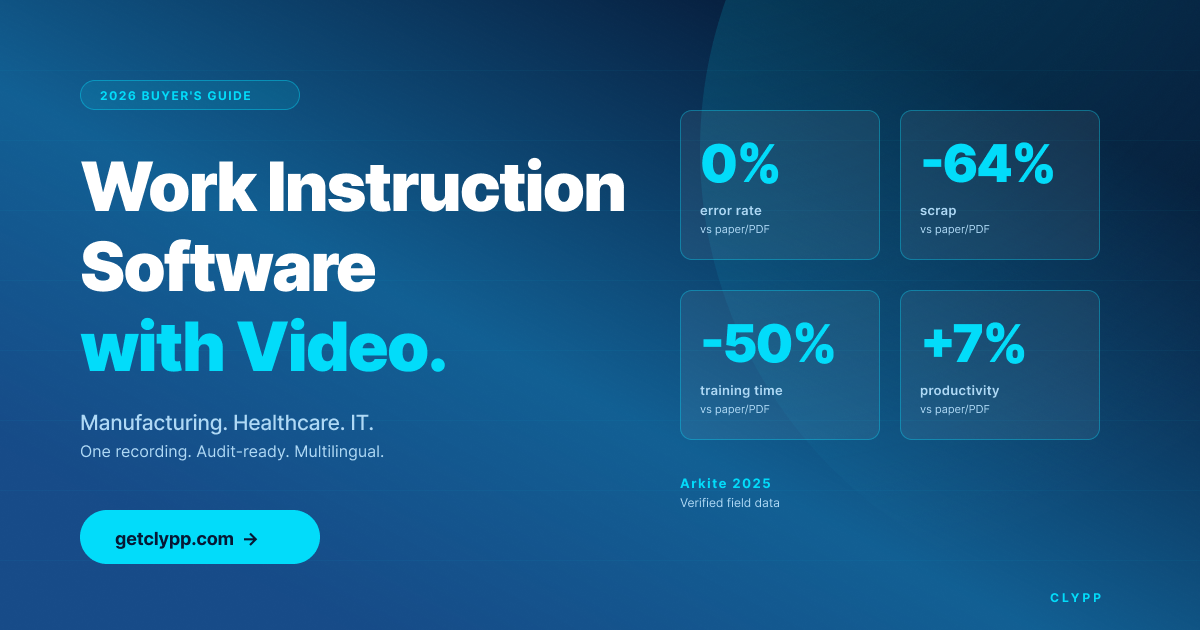
The hard outcome data backs it up. Industry case studies from digital work instruction deployments (Arkite, 2025) report error rates dropping from 0.12% to 0%, scrap and rework reduced by 64%, training time cut by 50%, and station productivity up 7% after switching from paper or static PDFs to structured digital work instructions. These are the numbers that justify a buying decision.
How work instruction software with video differs from adjacent categories
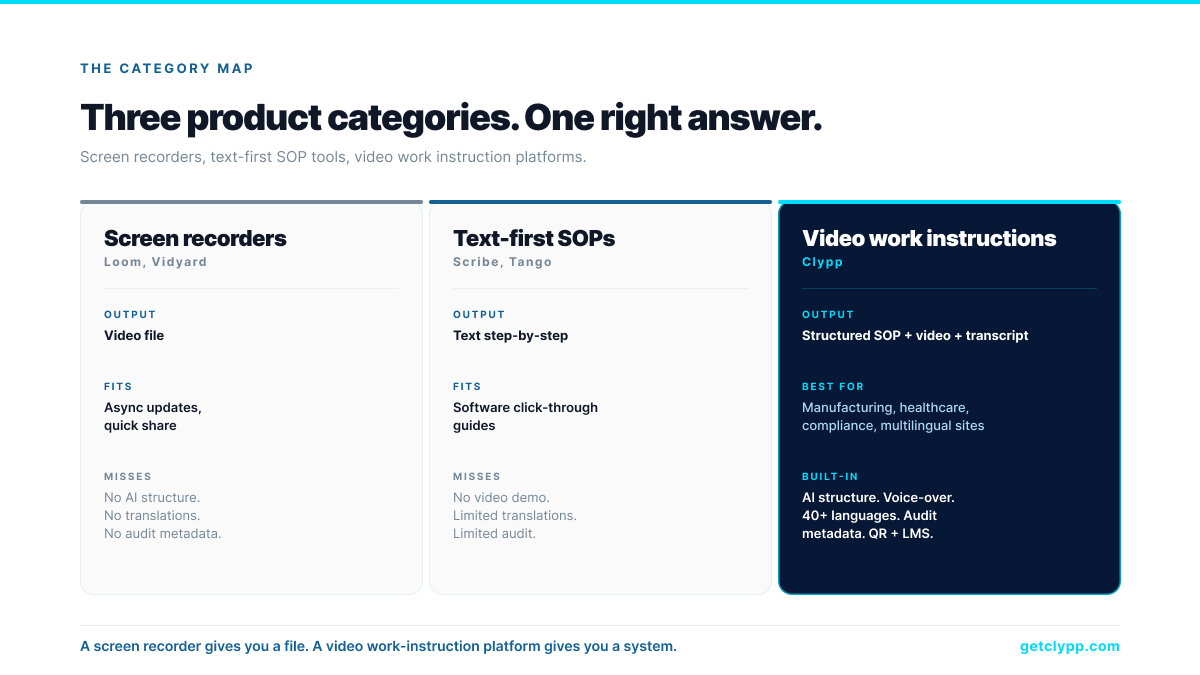
Three product categories often get conflated in RFP conversations, but they solve very different problems:
• Screen recorders (Loom, Vidyard) produce a video file, nothing more. No AI segmentation, no translations, no audit metadata, no shop-floor distribution.
• Text-first SOP tools (Scribe, Tango) produce a written step-by-step guide built from clicks. Good for software click-throughs; limited on video demonstration, translations and audit.
• Video work instruction software (Clypp) produces a structured deliverable (video plus segmented steps with screenshots plus narration plus 100+ language translations plus audit metadata) all from the same recording.
The crucial distinction: a screen recorder produces a file; a text-first SOP tool produces a written guide; work instruction software with video produces a structured, audit-ready deliverable in both formats from the same recording.
The 2026 buyer's checklist (seven non-negotiables)
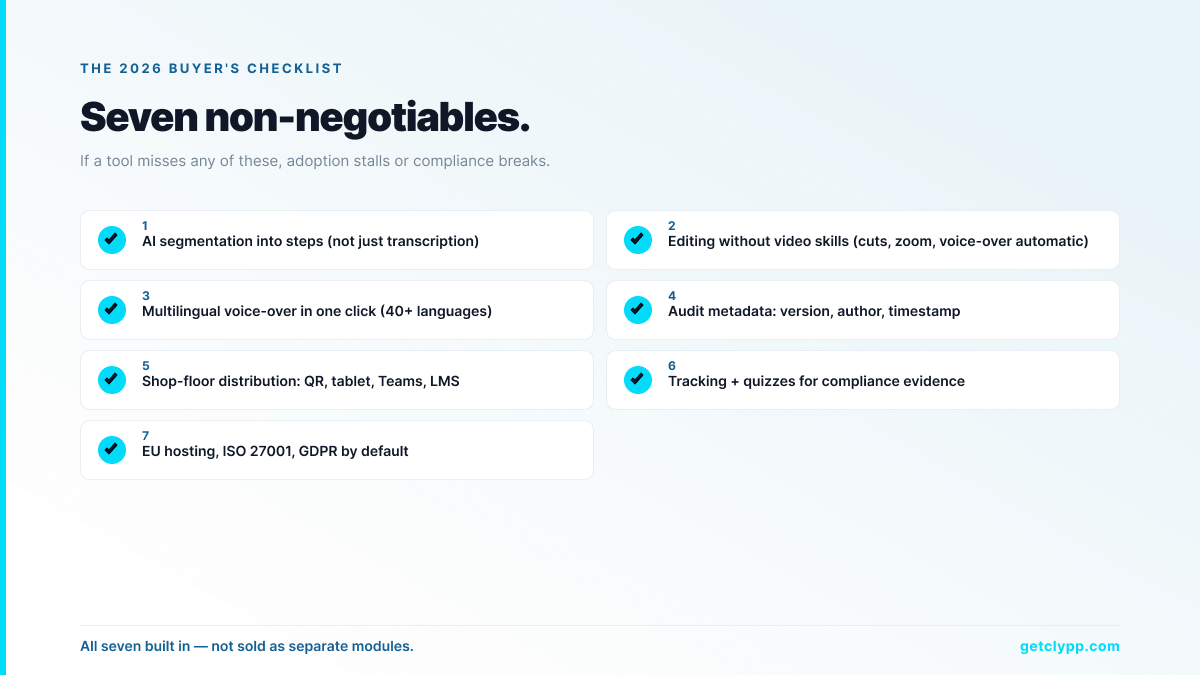
1. AI segmentation into discrete steps with screenshots and headings, not just transcription or subtitles.
2. Editing without video skills. Operators and SMEs are not editors. The tool must handle cuts, zooms and voice-over by itself.
3. Multilingual delivery in one click: including voice-over and on-screen text, not just subtitles.
4. Audit-compliant export with version, author and timestamp metadata. Required for ISO 9001 audits, GoBD procedural documentation and internal control systems.
5. Shop-floor distribution: QR codes for tablets at the workstation, native MS Teams embedding, SCORM export for the LMS, universal embed codes for Confluence/SharePoint/wiki.
6. Tracking and quizzes for compliance proof. View tracking per employee, drop-off heatmaps, quiz results stored in the platform or exported.
7. EU hosting, ISO 27001 certification and GDPR alignment. For European buyers this is procurement-mandatory.
Industry-specific use cases
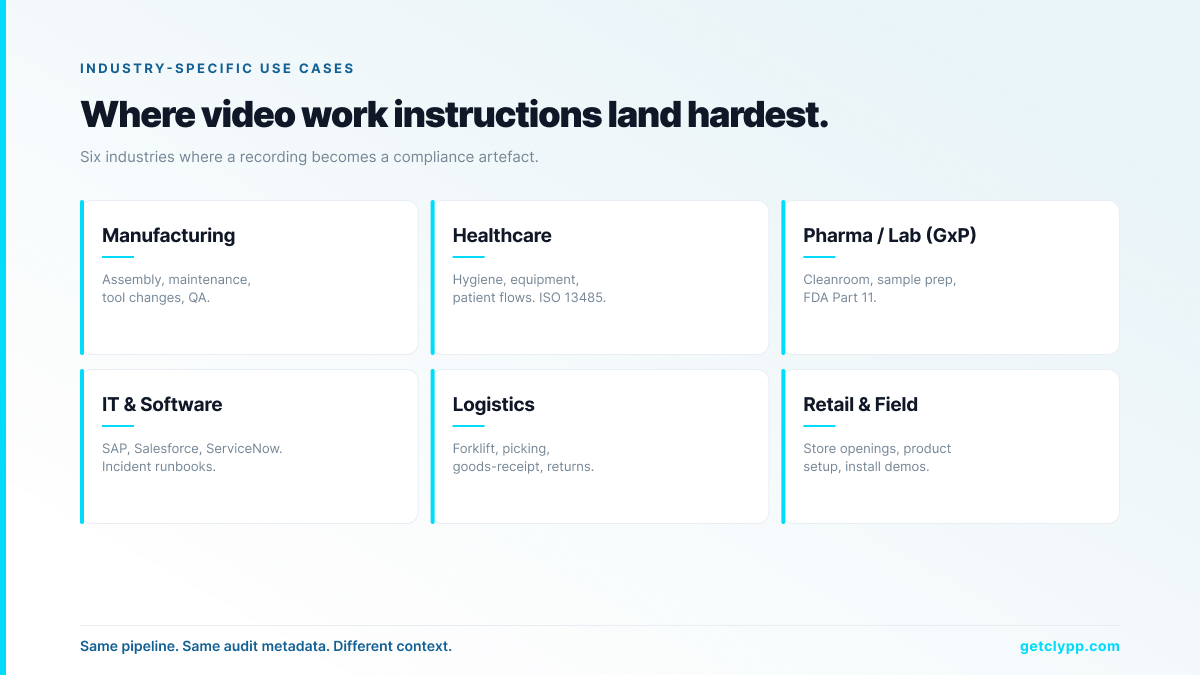
Manufacturing
Assembly, maintenance, tool changes and quality inspection, the highest-value processes. Distribution via QR code at the workstation; SCORM export to the LMS for compliance evidence. Verified case data (Arkite, 2025): error rate to 0%, scrap and rework down 64%, training time halved.
Healthcare and clinical operations
Standard procedures for hygiene, equipment handling, patient onboarding flows. Video work instructions are particularly valuable because they capture motion and positioning, elements that text and static photos cannot convey. Audit-compliant metadata supports ISO 13485 and GxP requirements.
Pharmaceutical and laboratory (GxP)
Cleanroom behaviour, sample preparation, instrument operation, deviation handling. Version control and audit trail are mandatory for FDA Part 11 and GxP, and the timestamp/author/version metadata produced by Clypp directly feeds the validation package.
IT and software operations
Incident response runbooks, software rollouts (SAP, Salesforce, ServiceNow), platform changeovers. Recording once and distributing globally eliminates the train-the-trainer bottleneck.
Logistics and warehousing
Forklift operation, picking, goods-receipt inspection, returns processing. QR codes on the rack or scanner-tablet open the relevant video at the moment of need.
Retail and field service
Store-opening procedures, product setup, post-installation customer demos. Multilingual delivery is critical for chains with international staff.
Where Clypp fits
Clypp is a video work instruction platform built by Zesavi GmbH in Munich. The product is designed around the seven-point checklist above, every item is built in, not added as a separate module.
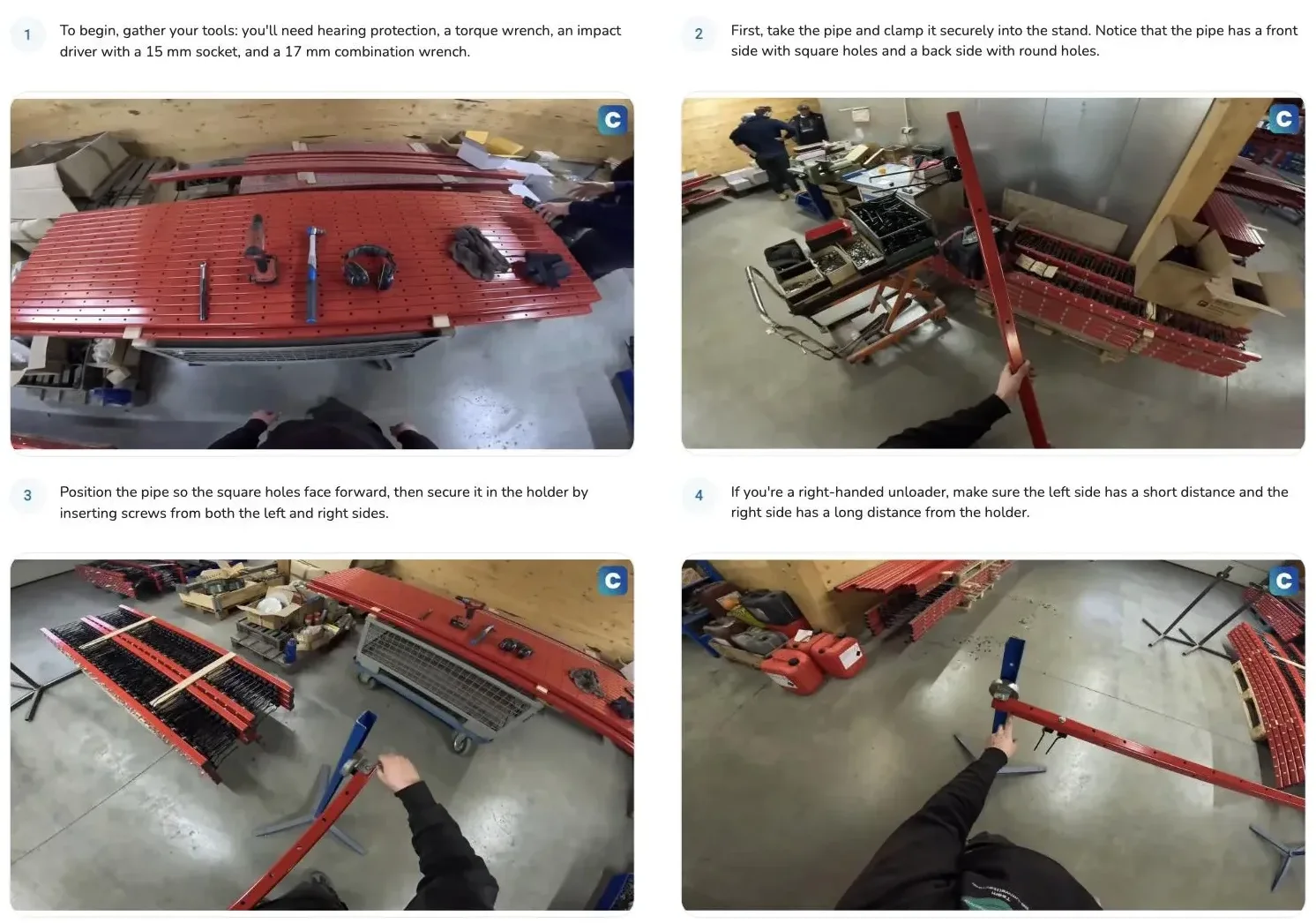
For regulated industries the decisive feature is audit-conform export. Clypp produces structured work instruction documents with version, author and timestamp metadata attached automatically, directly usable for ISO 9001 audits, GoBD procedural documentation, FDA Part 11 / GxP validation packages and internal control systems. A recording is not just a training video; it is a defensible compliance artefact.
Customers include Elementar Analysensysteme, Rosenberger Hochfrequenztechnik and Unternehmensgruppe Nassauische Heimstätte. Infrastructure is ISO 27001-certified, EU-hosted and GDPR-aligned. Native integrations cover Microsoft Teams, Atlassian Trello, Jira and SAP, plus QR codes for shop-floor tablets and SCORM export for any LMS. A free workspace is available for small teams without a credit card; current plan details are at getclypp.com/pricing.
How to evaluate work instruction software with video in one week
1. Day 1: pick three real processes, one safety-critical, one software-driven, one manual.
2. Day 2: record each on the candidate tools. Time the capture and review.
3. Day 3: have a non-native speaker review the auto-translated output. Listen to the voice-over. Read the on-screen text.
4. Day 4: embed the output where it will be consumed, MS Teams, tablet at a workstation, LMS via SCORM.
5. Day 5: have an operator who has never seen the process try to perform it using only the video. Capture the pain points.
6. Day 6: pull the audit metadata. Check version, author, timestamp. Confirm it satisfies your compliance team.
7. Day 7: only now compare commercial terms.
ROI example: a 200-person manufacturing site
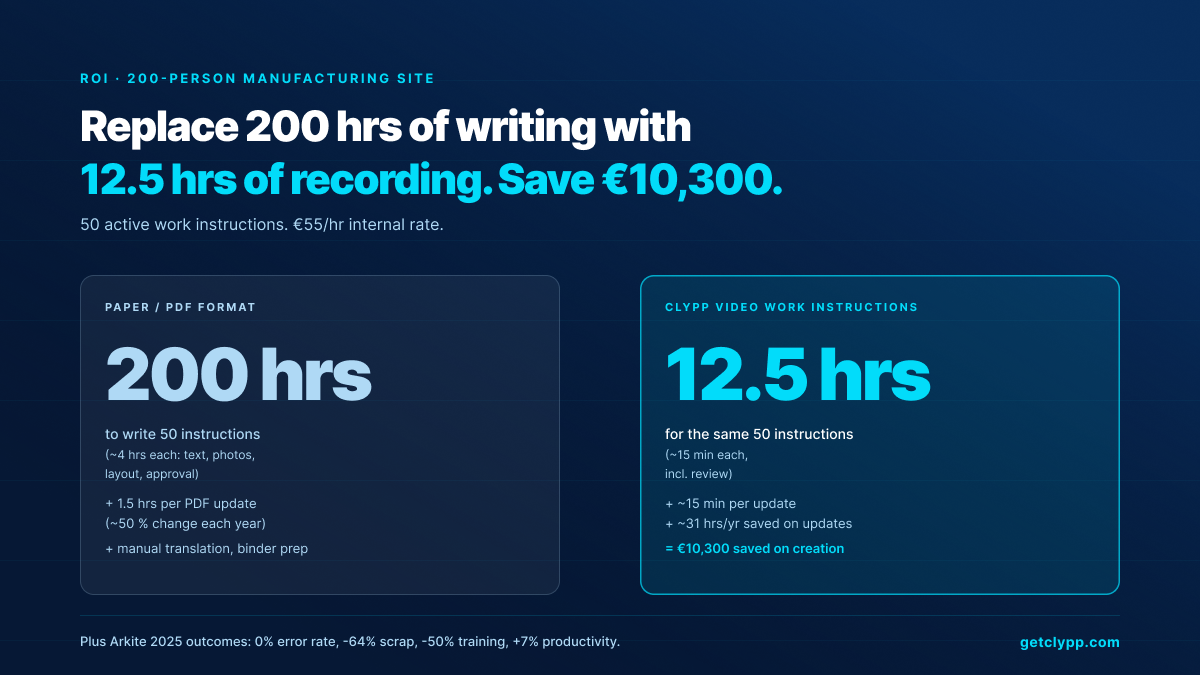
A site has 50 active work instructions. Creating them in the classic format averaged 4 hours per document, 200 hours total. With Clypp, re-recording takes ~15 minutes per instruction including review, 12.5 hours total.
At an internal hourly rate of €55, that is roughly €10,300 saved on creation alone. Half of the instructions change each year (new equipment, new regulations, new products). Where a PDF revision typically takes 1.5 hours, a fresh recording is done in 15 minutes, another ~31 hours saved annually.
The operational impact is larger than the time savings. Industry case data (Arkite, 2025) shows error rates dropping to zero, scrap and rework down 64%, training time halved and productivity up 7% per station. On a 200-person site with a single-digit-million annual production cost, those percentages add up quickly.
Frequently asked questions
Is work instruction software with video the same as Loom or Scribe?
No. Loom is a screen recorder, output is a video file. Scribe is a text-first SOP tool, output is a written step-by-step guide built from clicks. Work instruction software with video produces a structured, audit-ready deliverable (video plus segmented steps with screenshots plus narration plus translations plus audit metadata) all from the same recording.
Will non-technical operators actually use this?
Yes. The category is designed so SMEs and operators create the content themselves, without video editing skills. Clypp customers describe employees creating productive videos in minutes without prior training. That is the threshold a tool has to clear to scale across a site.
How is compliance and training evidence handled?
Clypp tracks views per employee, runs end-of-instruction quizzes and stores or exports the results. Audit metadata (version, author, timestamp) is attached to every export. This satisfies the documentation requirements of ISO 9001:2015 §7.5 and supports DGUV Vorschrift 1 evidence; the formal signed Unterweisungs-Nachweis may still be required separately in some jurisdictions.
Does it work on shop-floor tablets and behind a VPN?
Yes. Clypp runs in any modern browser and has native iOS and Android apps. It works behind Citrix Gateway, AnyDesk and similar VPN setups standard in industrial environments. The common deployment pattern is a QR code at the machine that opens the relevant video on a wall-mounted or handheld tablet.
What integrations are included?
Native integrations cover Microsoft Teams, Atlassian Trello, Jira and SAP. Universal embed codes work in Confluence, SharePoint, ServiceNow, any wiki and any intranet. SCORM export feeds any LMS. An API is available for custom workflows.
How does Clypp meet EU data protection requirements?
Clypp is ISO 27001-certified, hosts exclusively on EU servers, and is fully GDPR-aligned by default. This is the standard configuration. There is no third-country data flow to contract around. It is the default choice for European buyers with strict data residency requirements.
How does Clypp pricing work?
A free workspace is available for small teams without a credit card; paid tiers exist for larger deployments and enterprise pricing for organisations with custom security, SSO and on-prem-style requirements. Current details are at getclypp.com/pricing.
Bottom line
Work instruction software with video is no longer an experiment. Verified industry data shows error rates dropping to zero, scrap and rework halved, training time cut by 50% and productivity gains at the station. The buyer's checklist is short: AI segmentation, no-skill editing, multilingual delivery, audit-compliant export, shop-floor distribution, tracking and EU-grade security. The product category that ticks every box (and is built specifically for European compliance) is video work instruction software, and Clypp is the platform purpose-built for it.
A checklist is only as good as the test that follows it.
Seven criteria are easy to tick off in a table. Whether software holds up in production comes down to a different question: can the person at the machine produce a usable instruction in two minutes, without training? That is what Clypp is built for.
- Record instead of commission: screen or smartphone, no prior knowledge needed.
- Video and written SOP in one pass: including AI voice-over and screenshots.
- EU hosting, SCORM export, 100+ languages: testable on your own process.
Clypp is a software platform from Germany for video work instructions. In use at RATIONAL, Rosenberger and Elementar, among others.

