
What is a knowledge base?
A knowledge base is a central, searchable collection of an organization's operational knowledge, including work instructions, SOPs, how-tos, FAQs, onboarding material and policies. It can be internal (for employees) or external (for customers), text-based or video-native. The point: make the knowledge in people's heads available to everyone and keep it current. McKinsey reports that employees spend an average of 1.8 hours per day searching for information, close to 20% of the workweek.
Why a knowledge base is a must-have in 2026
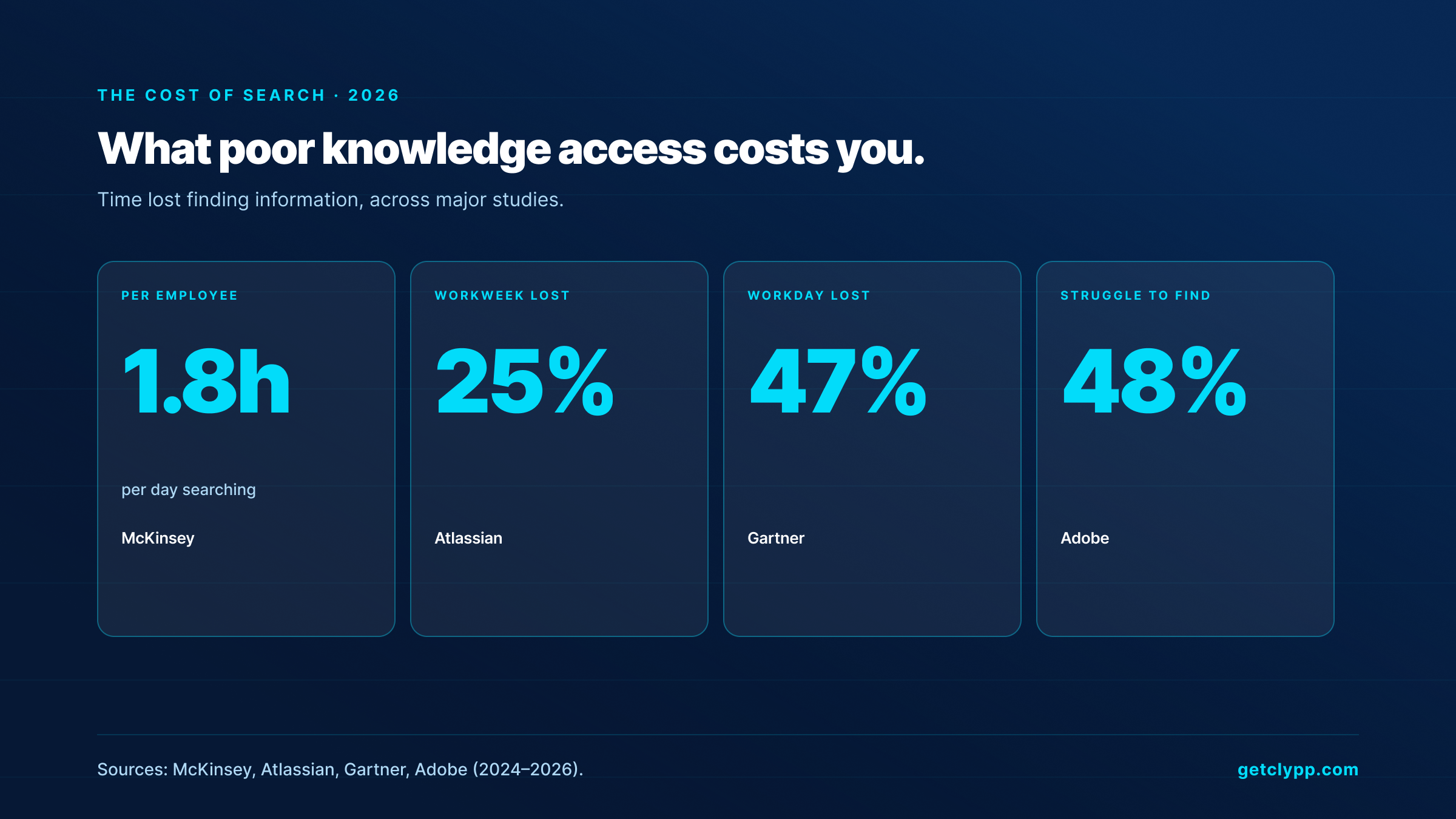
Operational pressure is building from two directions. On one side, time lost to search: McKinsey measures 1.8 hours per employee per day, Atlassian reports up to 25% of the workweek, Gartner cites 47% of the workday and an average of 18 minutes per document. An Adobe study found that 48% of employees regularly struggle to find documents.
On the other side, the demographic reality. Experienced employees retire, younger colleagues expect answers instantly and prefer video over text. TechSmith's 2026 research reports that 83% of people prefer learning from video over text or audio. Knowledge that lives only in heads or in scattered files becomes an operational risk.
The good news: the ROI of good knowledge work is measurable. McKinsey reports 20 to 25% productivity gains for organizations with mature knowledge management. Over 70% of large enterprises have already implemented at least one knowledge management system, according to Speakwise 2026 data. The question is rarely if, but which and in what format.
Types of knowledge bases
Before picking a tool, clarify two axes. Axis one: audience. Axis two: format.
Internal vs. external
An internal knowledge base serves employees. It holds playbooks, onboarding material, HR policies, IT runbooks, operating and work instructions. Confluence, Notion, Guru, Nuclino and Clypp all serve this case. An external knowledge base serves customers and forms a help center. Document360, Zendesk Guide and HubSpot Knowledge Base are common here. The most frequent mistake is doing both in one tool.
Text-first vs. video-native
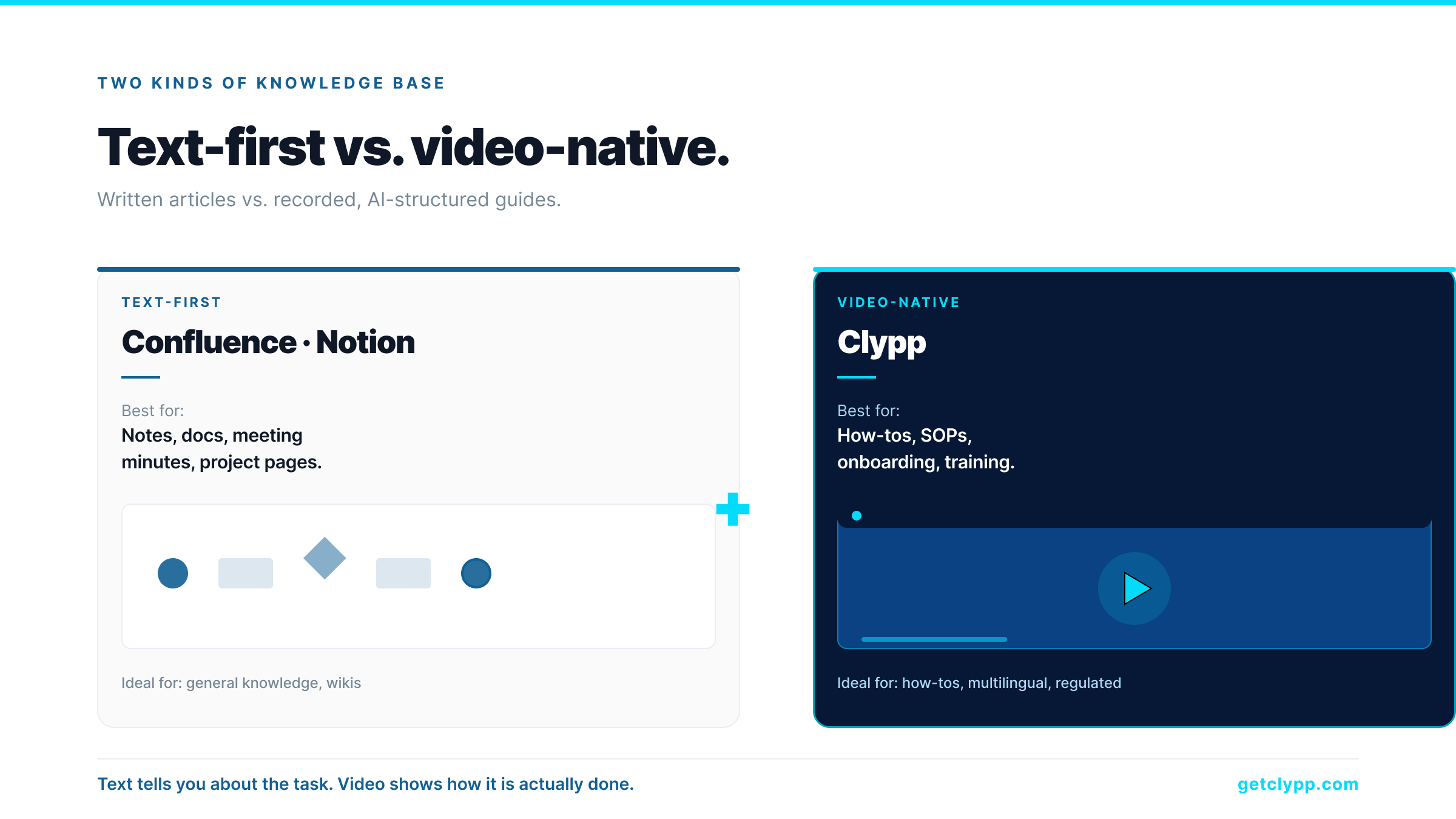
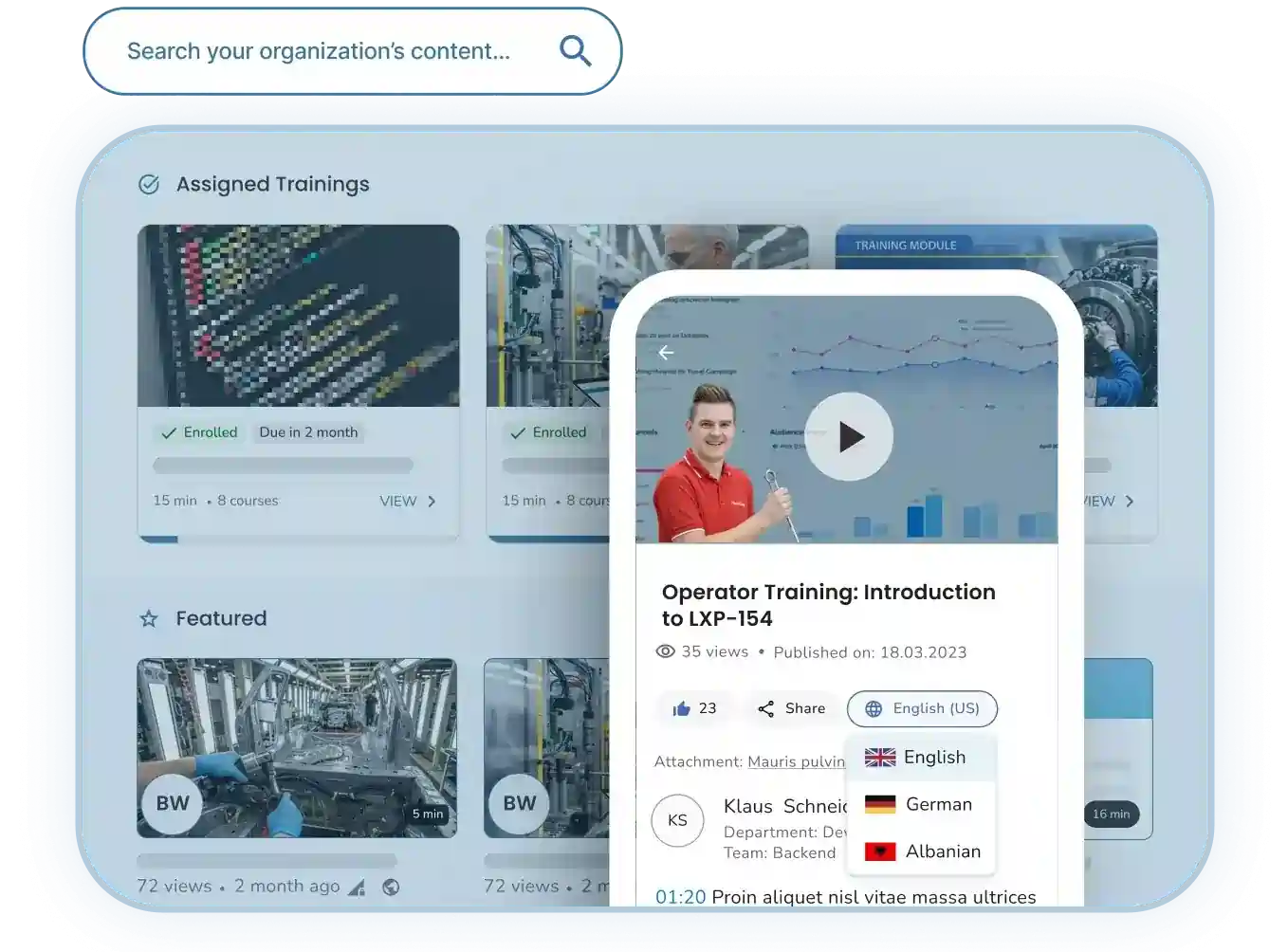
Classical knowledge bases are text-centric. Confluence, Notion and SharePoint build their search and structure around written articles. Video is supported as an embed but not maintained as a primary format. Video-native platforms like Clypp invert the relationship: the recording is the content, AI generates transcript, screenshots and structured steps as supporting material. For how-to guides, software walkthroughs and safety instructions this is often the better fit.
Siloed vs. unified
Some tools build their knowledge in isolation (Notion, Nuclino), others pull knowledge from connected sources (Glean, monday service). For companies with many tools (Slack, Google Drive, Salesforce, Jira) the connector story becomes a selection criterion.
The 2026 selection criteria checklist
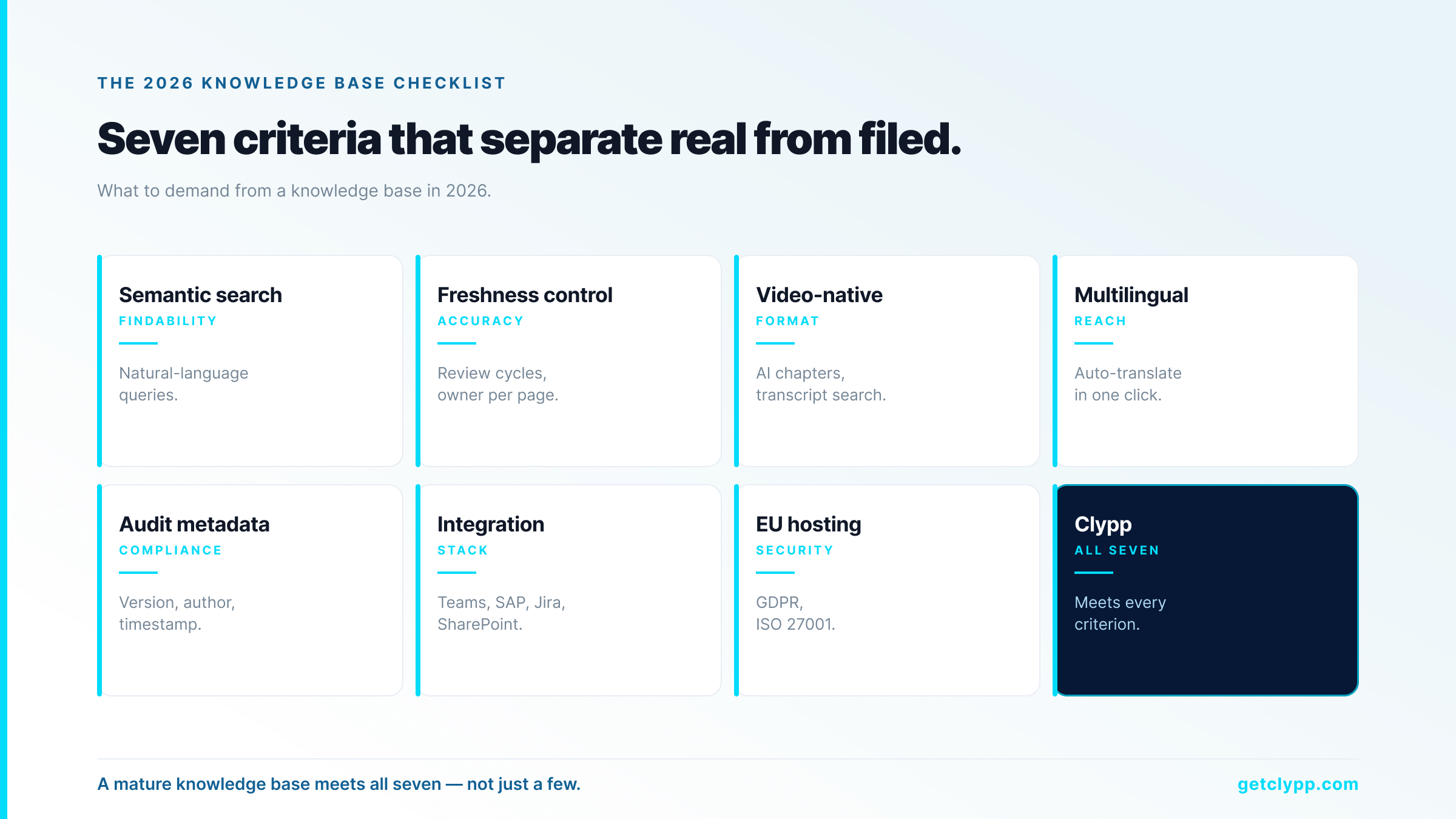
Seven criteria separate mature knowledge bases from mere file dumps:
• 1. Semantic search instead of keyword search. Users ask questions in natural language, not in database grammar.
• 2. Freshness control. Review cycles, expiry dates, owner per page. AI without staleness detection answers confidently from outdated content.
• 3. Video support as a first-class format. Not just embed but AI-structured chapters, transcript search, subtitles and translations.
• 4. Multilingual delivery in one click. In sites with multilingual workforces, auto-translation is mandatory, not a nice-to-have.
• 5. Audit metadata. Version, author, timestamp. Non-negotiable for ISO 9001, GoBD and regulated industries.
• 6. Integration with the existing stack. MS Teams, SAP, Jira, Confluence, SharePoint, LMS via SCORM.
• 7. EU hosting, GDPR, ISO 27001. For European companies this is a procurement requirement, not a negotiation.
Knowledge base vendors 2026 side by side
| Criterion | Clypp | Confluence | Notion | Guru | Nuclino | Bloomfire |
|---|---|---|---|---|---|---|
| Video-native | Yes, AI-structured | Embed only | Embed only | No | No | Yes (transcript search) |
| Auto-translation, 100+ languages | Yes (voice + text) | No | No | No | No | No |
| Audit metadata (version/author/time) | Automatic | Yes | Limited | Yes | Limited | Yes |
| EU hosting | Yes (Germany) | Enterprise option | No (US) | No (US) | Yes (Frankfurt) | No (US) |
| ISO 27001 | Yes | Yes | Yes | Yes | Yes | Yes |
| SCORM export | Yes | Add-on | No | No | No | Add-on |
| Native SAP / Teams integration | Yes | Teams yes, SAP add-on | Teams yes | Teams yes | Teams yes | Teams yes |
| Free tier | Yes, no card | Up to 10 users | Yes | 14-day trial | Free tier | No |
The table shows the most common selection situation in European companies. Confluence and Notion dominate as generic knowledge workspaces. Guru and Bloomfire address the sales and support environment. Nuclino is the only directly comparable EU-hosted alternative in Frankfurt, but without native video structure. Clypp positions differently: video-native, with AI segmentation, auto-translation in 100+ languages, audit metadata built in, and EU hosting in Germany.
When Clypp is the right knowledge base
Clypp does not replace a text-first knowledge base for general notes, meeting minutes or project documentation. For those cases Confluence, Notion or Nuclino remain the right choice. Clypp is the right knowledge base when:
• Your most important knowledge is how-to knowledge, meaning guides for software, machines, processes or standard tasks.
• Your workforce is multilingual and guides are needed in more than three languages.
• You work in a regulated environment (ISO 9001, GoBD, occupational safety, GxP) and need audit-conform metadata coming straight out of the documentation.
• Your employees access guides at the workplace on tablets or smartphones and QR codes on the rack, machine or workstation are standard.
• Your data protection officer requires EU hosting, ISO 27001 certification and GDPR compliance from a single source.
Where Clypp fits
Clypp is a video-native knowledge base built by Zesavi GmbH in Munich. The platform covers the whole path from capture to deployment: the SME records a task in the browser, AI segments it automatically into steps with screenshots and voice-over, auto-translates into 100+ languages, and exports as video, PDF, SCORM or embedded Teams card.
For regulated industries the decisive feature is audit-conform export. Clypp guides include version, author and timestamp metadata automatically, and can be used directly as documented information under ISO 9001:2015 §7.5, as evidence under DGUV Vorschrift 1 and for GoBD procedural documentation. Infrastructure is ISO 27001-certified, EU-hosted in Germany and GDPR-aligned. Native integrations for Microsoft Teams, Atlassian Trello, Jira and SAP. Customers include Elementar Analysensysteme, Rosenberger Hochfrequenztechnik and Unternehmensgruppe Nassauische Heimstätte. A free workspace is available for small teams without a credit card; current plan details are at getclypp.com/pricing.
Use cases
IT runbooks and software how-tos
Frequent how-tos for SAP, Salesforce, ServiceNow, Confluence administration, VPN setup. Instead of the 40th support ticket, the 40th view of the video guide.
Manufacturing and maintenance instructions
Assembly, tool changes, maintenance, quality inspection. A QR code at the workstation opens the right video on a tablet, in the employee's language.
Onboarding and ramp-up
New hires learn from structured videos rather than long PDFs. Forrester (2026) reports 47% higher retention for video onboarding compared to text onboarding.
Safety and compliance training
Mandatory training under §12 ArbSchG, GxP, FDA Part 11. Video with quiz and view tracking as evidence, metadata for audit preparation.
Customer success and support knowledge
The 20 most common customer questions as video-structured guides. Industry deployments report 20 to 30% ticket reduction once the videos become visible in the help center.
ROI example: 100-person company
A team of 100 employees spends around 20% of the workweek searching for information, according to McKinsey. At an internal hourly rate of €55 and a 40-hour week that comes to around €440 per person per week, so over €2M per year for the whole team.
Realistically, good knowledge bases reduce this time by up to 35% (McKinsey). For 100 employees at the hourly rate above, that is around €700K per year, with no new role needing to be created. Even capturing only a third of that saving realistically leaves the business case in a clear six-figure range per year.
On top of that come the softer effects: faster onboarding, lower dependency on individual knowledge holders, multilingual availability without a translation project, audit-conform documentation as a by-product.
How to launch your first knowledge base in 30 days
• Days 1 to 5: collect the 20 most frequent questions in the team. Who gets interrupted how often with what?
• Days 6 to 15: for each question, a short recording of the person who normally answers. 2 to 5 minutes per recording.
• Days 16 to 20: AI-structure, translate, review. Result: 20 finished, multilingual how-tos.
• Days 21 to 25: embed in MS Teams or Confluence, place QR codes at workstations, integrate into the LMS as SCORM.
• Days 26 to 30: measure search and view rates. Prioritize the next 20 questions.
Frequently asked questions
Is Clypp an alternative to Confluence or Notion?
Only partially. For general notes, meeting minutes and project documentation, Confluence and Notion remain the right choice. For video-based how-tos, work instructions and onboarding guides, Clypp is the specialized solution. Many customers run both in parallel, with Clypp videos embedded in Confluence or Notion pages.
What is the difference between a knowledge base and a wiki?
The terms are used interchangeably. Historically, wiki suggested openly editable pages (the Wikipedia model), knowledge base suggested curated content with owner and review. In practice in 2026 the difference blurs because modern knowledge bases are collaborative and wikis have verification workflows.
How does Clypp keep content current?
Two mechanisms. First, easy re-recording: a changed task is re-recorded in minutes, an order of magnitude less effort than a classical PDF update. Second, owner assignments and review cycles per video. Every video carries version, author and timestamp so it stays audit-traceable.
Is the AI search GDPR-compliant?
Yes. Clypp hosts exclusively on EU servers in Germany, is ISO 27001-certified and fully GDPR-aligned. AI processing happens inside the EU infrastructure; no data flows to third countries without contractual protection. The default for public sector, insurance and regulated industries.
Can Clypp import existing PDFs or text content?
The primary focus is video-native guides because that is where the value is largest. For mixed setups the combination with a text-first tool like Confluence or Notion works well; Clypp videos are embedded into the existing knowledge stack.
How many languages does auto-translation support?
Over 40, including all major European languages plus Arabic, Turkish, Polish, Romanian, Mandarin and Hindi. Subtitles, voice-over and on-screen text are translated at one click, critical in sites with multilingual workforces.
What does Clypp cost?
A free workspace is available for small teams without a credit card; paid tiers exist for larger deployments and enterprise pricing for organizations with custom requirements. Current details are at getclypp.com/pricing.
Bottom line
A knowledge base is no longer a nice-to-have in 2026, it is operational necessity. McKinsey expects 20 to 25% productivity gains from mature knowledge management. The question is rarely if, but which combination of tools fits. For general text content, Confluence and Notion remain the common choice. For how-to knowledge, work instructions, multilingual guides and regulated environments, a video-native knowledge base like Clypp is the specialized, complementary solution, built in Munich, hosted in the EU, purpose-designed for European compliance.
A knowledge base is only as good as what actually goes into it.
Choosing the software is the easy part. The hard part is getting people to contribute, and writing is the highest bar you can set them. Let them record instead, and they will.
- Two minutes of recording instead of an hour of writing: the barrier drops.
- Searchable automatically: transcript, steps and translations are produced with it.
- Complements existing systems: Teams, Confluence, an LMS or the intranet.
Clypp is a software platform from Germany for video work instructions. In use at RATIONAL, Rosenberger and Elementar, among others.

